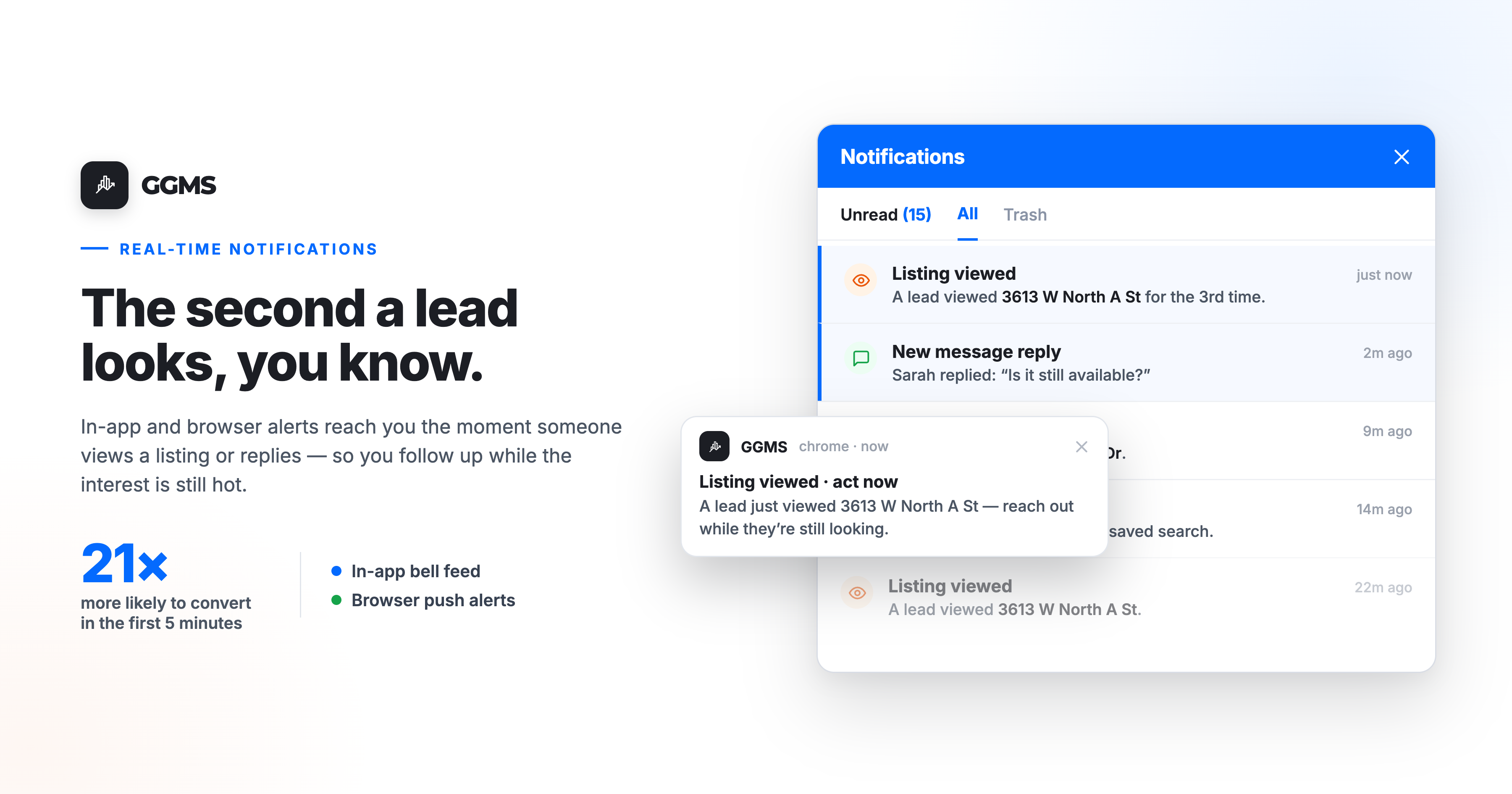
Real-time lead notifications alert you the instant a lead engages — the moment they view a listing, reply to a message, or take any action worth responding to. Instead of finding out tomorrow, you find out now, while the interest is still hot. And in real estate, now is the whole game.
Picture it: it's 8:47 on a Tuesday night. A buyer you spoke with last week pulls up the listing at 3613 W North A Street for the third time. They linger. They're interested. In most systems, you'd hear about that the next morning — if at all. By then the moment has cooled, and so has the buyer.
GGMS does it differently. The second that listing gets viewed, you know. This post breaks down how real-time lead notifications work in GGMS, and why they're one of the highest-leverage tools you have for follow-up.
Why speed to lead decides who wins the deal
Before the "how," here's the "why it matters." The data on lead response time is brutally consistent:
- Leads contacted within 5 minutes are roughly 21x more likely to convert than leads contacted after 30 minutes (widely cited lead-response research, Harvard Business Review).
- 78% of buyers work with the first agent who responds — not the best agent, the first one (National Association of Realtors).
- The average agent takes 15+ hours to respond to a web lead. By then the prospect has already contacted two or three competitors and may have booked a showing.
This is what the industry calls "speed to lead," and it's the cheapest competitive advantage in real estate that almost nobody actually buys. The bottleneck usually isn't effort — it's awareness. You can't respond fast to something you don't know happened. That's the exact gap real-time lead notifications close.
How real-time lead notifications work in GGMS
We built notifications to reach you wherever you are, which is why there are two types that work together.
In-App notifications
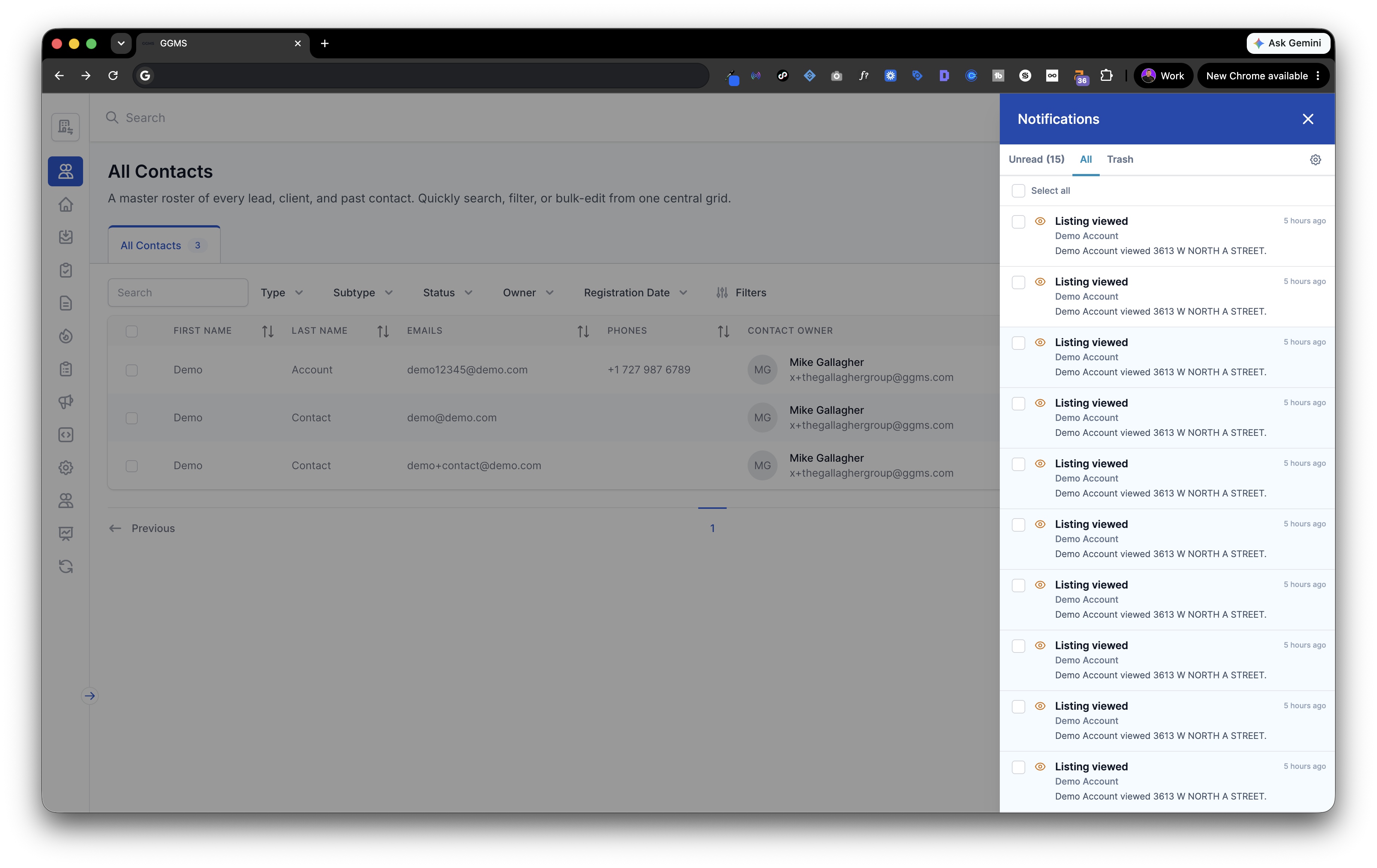
In-App notifications live in the bell icon at the top of your GGMS dashboard. Click it and you get a running feed of your most recent activity — every listing view, every lead action, in one place. This is your command center for the times you're already working inside GGMS. No digging, no refreshing. The bell keeps a tally and waits for you.
Browser notifications
Browser notifications are the ones that come find you. Even when you've clicked away to your email, your calendar, or a property-research tab — as long as GGMS is still open somewhere in your browser — a notification pops right onto your screen. You don't have to be looking at GGMS for GGMS to reach you. That's the difference between catching a hot lead and missing one.
Used together, they cover both states an agent is ever in: heads-down inside the CRM, or off doing the hundred other things the job demands. Either way, you stay in the loop in real time.
What real-time notifications mean for your follow-up
Here's the part that's easy to underestimate. When a "Listing viewed" notification hits the moment it happens, you can act on intent while the intent is still warm:
- Follow up with context, not fluff. Instead of a generic "just checking in," you can say: "Saw you were looking at the North A Street place — want me to pull comps or set up a showing?" That lands completely differently. It tells the client you're paying attention.
- Prioritize the right people. You have a full contact list and limited hours. Notifications surface who's actively engaging today, so your energy goes where it converts.
- Beat the other agent to the conversation. Speed wins. The agent who responds first usually owns the relationship. Real-time alerts make you that agent by default.
- Turn one signal into a sequence. Speed gets you the first conversation; persistence closes the deal. Most agents quit after one or two touches — a real-time alert is the natural trigger to start a consistent, multi-touch follow-up instead.
A small habit that compounds
None of this requires a new workflow. You don't babysit a dashboard or check a feed on a schedule — the notifications do the watching, and you respond when one shows up. Over a week, that's a handful of perfectly timed touches you simply wouldn't have made otherwise. Over a quarter, that's deals.
That's the quiet power of real-time lead notifications. It's not flashy automation promising to replace your judgment. It's a tool that puts the right information in front of you at the exact moment your judgment is most valuable.
How to turn on real-time lead notifications in GGMS
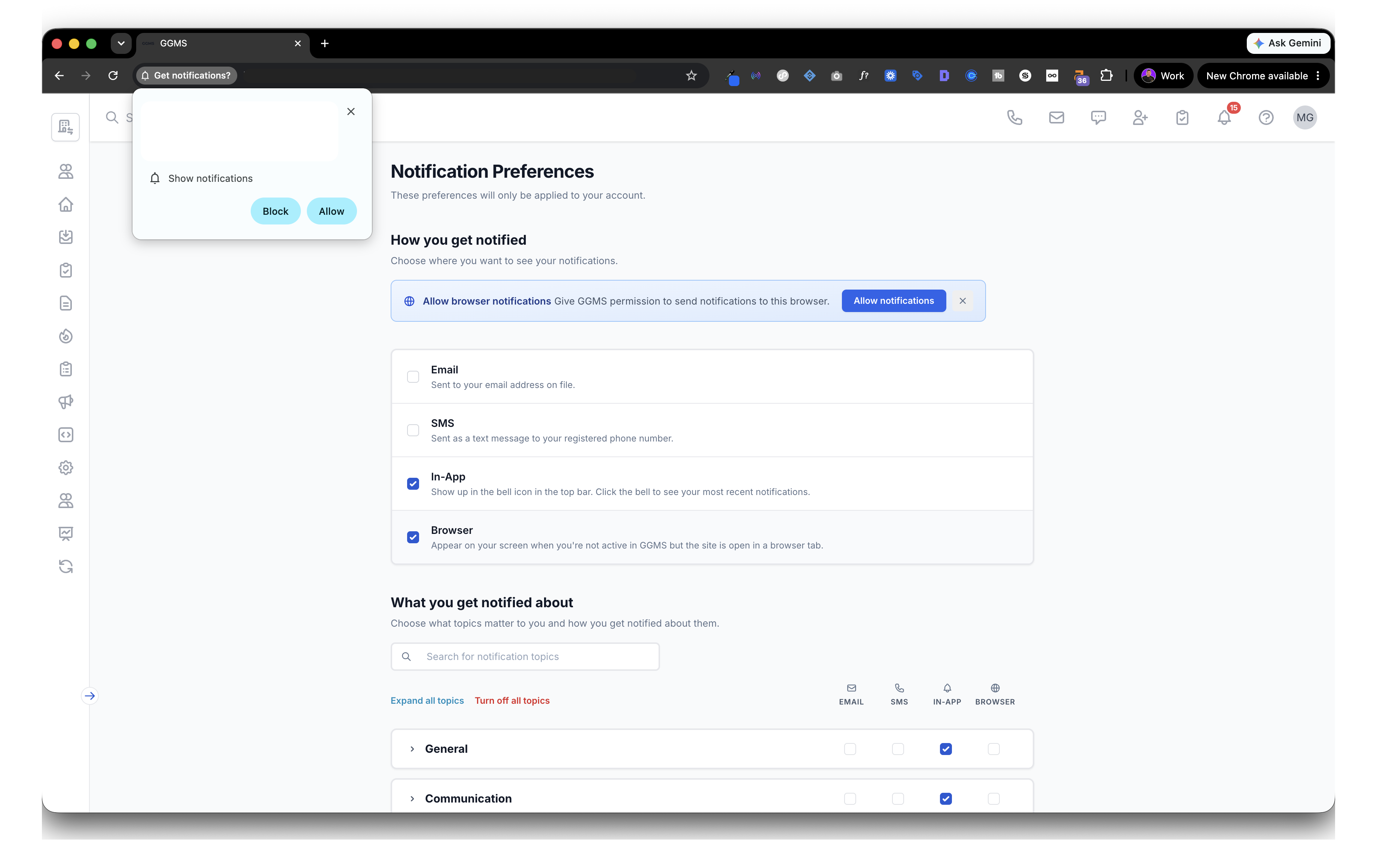
- Open your Notification Preferences in GGMS.
- Under How you get notified, switch on In-App and Browser.
- When your browser asks for permission, click Allow so notifications can appear on your screen.
- Under What you get notified about, choose the topics that matter — listing views, communication, and the rest — so every alert is one worth acting on.
Then get back to work. GGMS will tap you on the shoulder when it counts.
FAQ
What are real-time lead notifications? Real-time lead notifications are instant alerts that tell you the moment a lead takes an action — like viewing one of your listings or replying to a message — so you can follow up immediately instead of hours later.
What's the difference between in-app and browser notifications? In-app notifications appear in the bell icon inside GGMS and give you a feed of recent activity while you're working in the app. Browser notifications pop onto your screen even when you're not actively in GGMS, as long as the site is open in a browser tab.
Why does lead response time matter so much in real estate? Because the first agent to respond usually wins. Industry research shows leads contacted within five minutes are dramatically more likely to convert, and most buyers work with whoever responds first. Real-time notifications make that five-minute window achievable.
Do real-time notifications replace following up? No. They're the trigger, not the whole system. The notification tells you when to reach out; consistent, multi-touch follow-up is what actually closes the deal.
.png)