You just got back from a listing shoot in Boise. Forty photos, a few drone passes, a twilight exterior you're genuinely proud of. The seller is excited and you want the gallery live tonight while that energy is high.
So you open your laptop — and before a single photo goes up, you've got homework. Resize each shot. Run it through a compressor. Export a web-friendly version. Then upload. Skip that step and your beautiful gallery turns into a heavy, slow page that makes buyers wait while it loads.
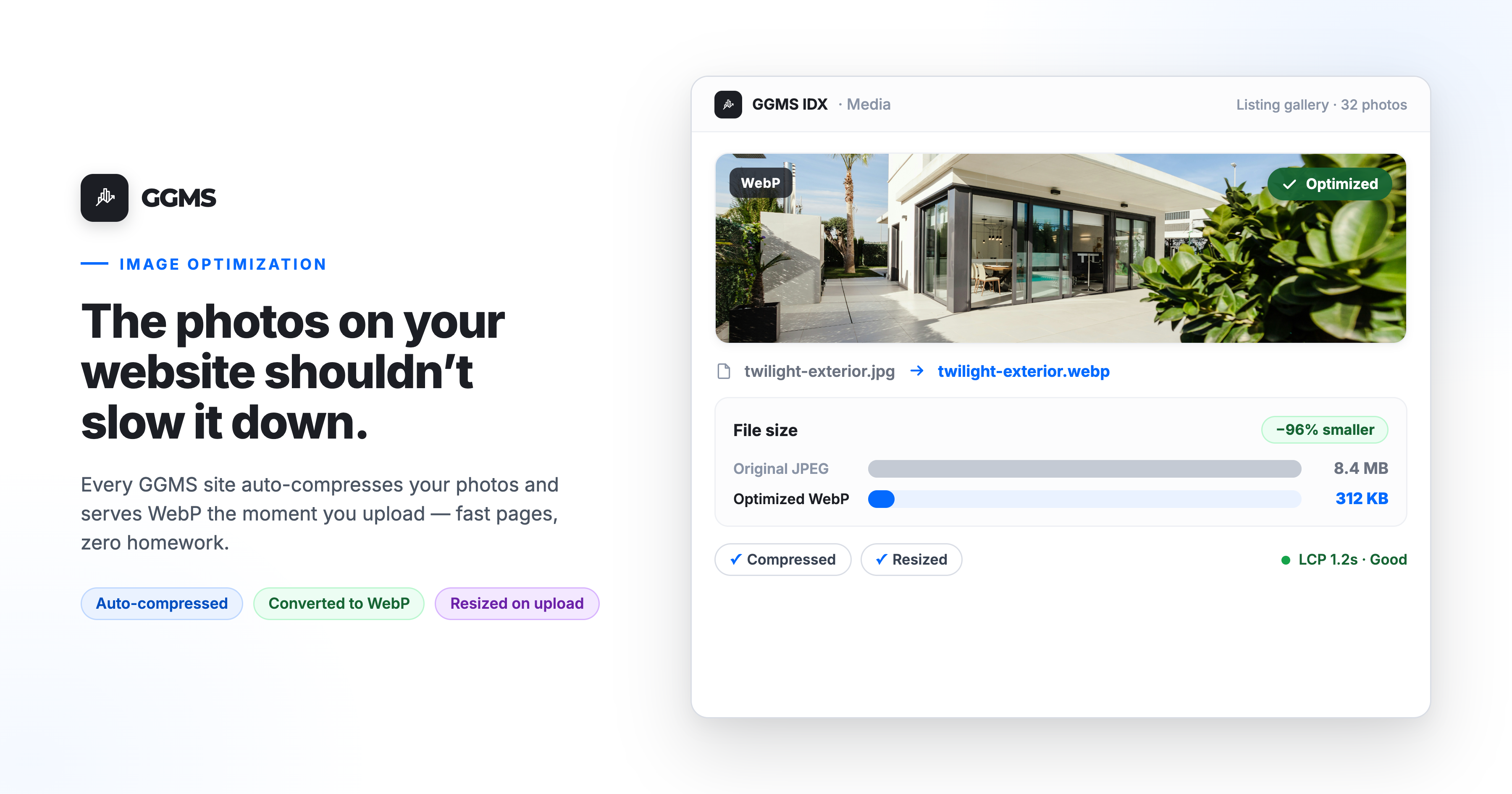
On a GGMS IDX site, that homework is already done. We run automatic image compression on every site, so the photos you upload are optimized the moment they land. You shoot, you upload, you publish. We carry the weight.
This post walks through what that actually buys you — faster pages, better search visibility, fewer lost leads — and why "compress it yourself first" is a step you shouldn't have to think about.
Heavy images are a quiet tax on your website
Most agents never see the cost of a big image file, because the damage shows up somewhere else: a buyer who clicks away before your photos render.
Images are the single biggest thing weighing down the average web page. According to the HTTP Archive's 2025 Web Almanac, the median home page is about 2.56 MB on mobile, and images account for more bytes than any other resource — more than the code, more than the fonts. Analysis from SpeedCurve puts images at roughly 40% of a typical page's total weight.
Now picture a real estate site, where the whole point is photography. A single listing gallery can carry dozens of high-resolution shots. Drop in a few uncompressed drone images straight off the SD card and one page can outweigh an entire normal website.
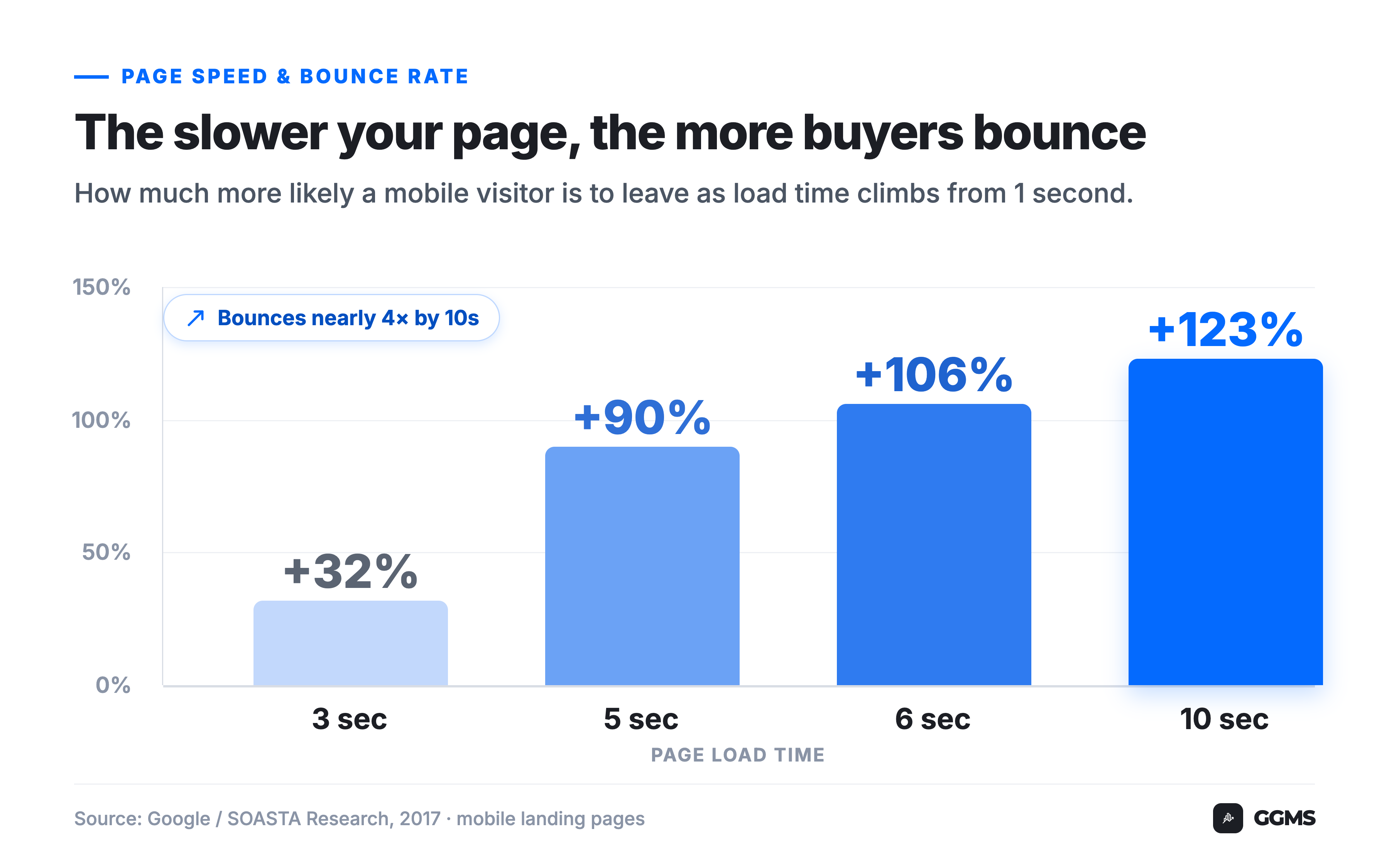
That weight turns into wait. And buyers don't wait. Google's research on mobile landing pages found that as a page goes from one second to three seconds to load, the probability of a visitor bouncing jumps 32% — and by ten seconds, it climbs 123%. Every heavy photo nudges you up that curve.
The old way: optimize everything yourself, every time
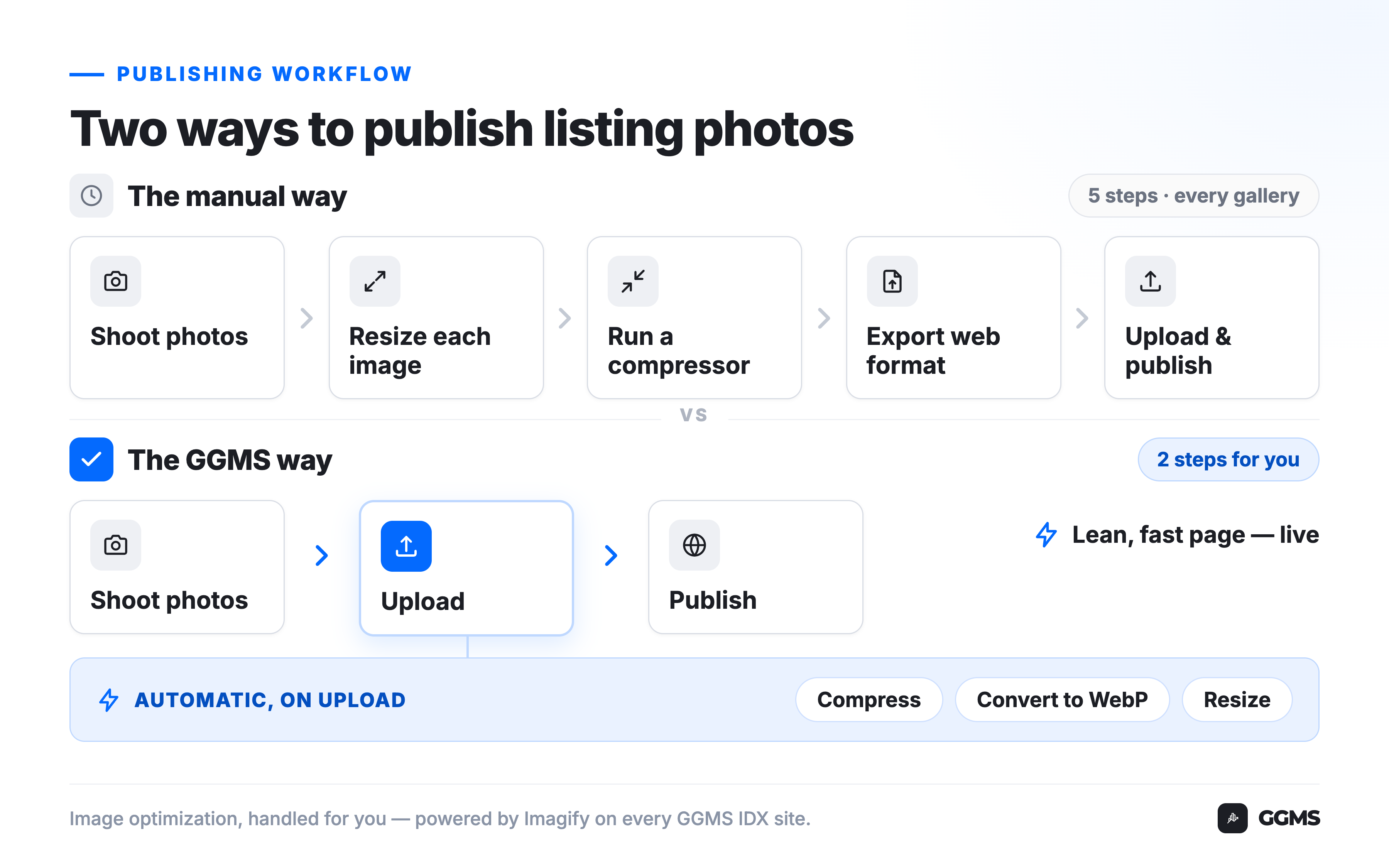
On a lot of real estate website setups, image optimization is on you. Some platforms will happily accept a 6,000-pixel, 8 MB original and serve it to every buyer exactly as-is. To do it right, you're expected to run a workflow like this before anything goes live:
- Resize each photo down to sensible web dimensions
- Compress it through a tool like TinyPNG, Squoosh, or "Save for Web"
- Convert it to a modern format if you happen to know that's a thing
- Upload the finished file — then repeat for every image in the gallery
To be fair, this works. Plenty of sharp agents and photographers do exactly this, and a well-optimized DIY site can be fast. The problem isn't that the method is wrong. It's that it's friction, and friction is the enemy of consistency.
When you're juggling three listings, a closing, and a buyer tour, "resize and compress 40 photos" is the first thing that gets skipped. So one listing page loads fast and the next one crawls, and you have no idea which is which. The work that protects your site speed is exactly the work that's easiest to drop when you're busy — which is most of the time.
The GGMS way: optimization happens the moment you upload
We took that whole workflow off your plate. Every GGMS IDX site runs Imagify, the image optimizer built by the team behind WP Rocket, and it works automatically in the background.
Here's what happens to a photo when you upload it to your site:
- It's compressed automatically. Imagify's smart compression balances file size against quality, so the photo gets dramatically lighter without a visible drop in how it looks.
- It's converted to WebP. WebP is a modern image format that's far more efficient than old JPEGs and PNGs — Google reports that WebP lossless images run about 26% smaller than PNG, at the same visible quality. Your site serves the WebP version to browsers that support it and falls back to the original JPEG or PNG for older ones, so nothing ever breaks.
- Oversized images get resized. Instead of shipping a giant camera-resolution file, the system scales it down to web-appropriate dimensions, which alone can cut file size by a large margin.
- Your originals are preserved. The full-resolution files are kept and can be restored, so you're never destroying your source photography.
Your part of the job shrinks to two steps: upload, publish. You shoot the listing the way you always have, drag the photos in, and the page that goes live is already lean and fast — without you opening a single image editor.
Want to see what your current listing pages actually weigh, and what they'd look like optimized? Email us at sales@ggms.com and we'll pull up your own site and walk through it with you.
What this looks like on a normal Tuesday
Say you're an agent in Raleigh. You list a renovated bungalow Tuesday morning, shoot it that afternoon, and you've got 30 photos plus a short walkthrough video to publish before dinner.
The old way, you'd be staring down 30 resize-and-compress cycles before you could even start uploading — or you'd shrug, upload the originals, and quietly hand every buyer a slow page. On GGMS, you upload the set and keep moving. Each photo is compressed and converted as it lands. By the time you hit publish, the gallery is optimized.
That night, a buyer scrolling on their phone taps your new listing. The hero shot snaps in fast instead of hanging on a gray box, they swipe through the whole gallery, and they fill out the form to ask about a showing. The lead is captured because the page was quick enough to keep them there. That's the entire point — speed isn't a vanity metric, it's the difference between a buyer who sticks around and one who's gone.
The same logic applies to your video. Hosting your walkthrough on your own site keeps that traffic with you instead of sending it to a third-party platform, and lighter images mean your media-heavy pages still load like a page that's mostly text.
How to see the difference for yourself
You don't have to take the speed gains on faith. Every GGMS site ships with Google Site Kit pre-installed, which puts PageSpeed Insights, Search Console, and Analytics right in your dashboard. Run one of your listing pages through PageSpeed Insights and look at the Largest Contentful Paint — that's the moment your biggest visible element finishes loading, and on a real estate page it's almost always a photo.
Largest Contentful Paint is one of Google's Core Web Vitals, the page-experience signals that feed into how Google evaluates your site. Google's guidance is to keep it under 2.5 seconds. Lighter images are the most direct lever you have on that number, which ties your photo workflow straight back to your local search visibility.
One honest caveat: image compression is a powerful lever, not a magic wand. It won't rescue a page bogged down by a heavy third-party script, an autoplaying 4K video, or a gallery that tries to load 60 full-size images at once. It's one important part of a fast site — handled for you — not the whole engine. We're telling you that plainly because the goal here is a site that's actually fast, not a number that looks good in a screenshot.
Frequently asked questions
Does compressing my listing photos make them look worse?
Not in any way a buyer will notice. Smart compression removes data the human eye can't perceive while keeping the visible quality intact, and because your full-resolution originals are preserved, nothing is permanently degraded. The buyer sees a sharp photo that simply loads faster.
What image format should real estate photos use — JPEG, PNG, or WebP?
For the web, WebP beats JPEG and PNG, because it delivers the same visual quality at a much smaller file size. On GGMS you don't have to choose or convert anything — your site automatically creates a WebP version of every photo and serves it to browsers that support it, falling back to the original JPEG or PNG when needed.
Do I still need to resize photos before uploading to my GGMS site?
No. The system resizes oversized images to web-appropriate dimensions and compresses them on upload, so you can drag in your shots without pre-processing. Uploading reasonably sized exports never hurts, but it isn't required.
How much do images really affect website speed and SEO?
A lot. Images are the largest contributor to page weight on a typical site, and slow pages both lose visitors and score worse on Core Web Vitals, which are part of Google's page-experience signals. Lighter images improve both the experience a buyer has and how search engines evaluate the page.
Will optimizing my images make my site rank higher on Google?
It makes your pages faster and eligible for stronger Core Web Vitals scores, which are a genuine ranking signal — but speed is one factor among many, and no honest platform can promise a specific ranking. Think of it as removing a handicap that slow images would otherwise put on you, not as a guaranteed jump to the top.
Can I get my original full-resolution photos back?
Yes. Originals are preserved and can be restored, so optimization is never a one-way door.
Want to see it running on your own site? Email sales@ggms.com and we'll show you what your pages weigh today and how they'd perform with optimization handled for you. Already a customer with a question about your setup? support@ggms.com is the place.
.png)