Most real estate leads aren't lost because the agent gave a bad pitch. They're lost in the gap between the moment a buyer raises their hand and the moment someone actually responds.
That gap is brutal. Agents who respond to a new inquiry within five minutes are roughly 21 times more likely to qualify that lead than agents who wait 30 minutes (Real Trends/InsideSales lead response research). And 78% of buyers end up working with the first agent who responds, according to NAR's 2025 data. Yet the average agent takes more than 15 hours to reply to a new lead, per Inman's 2025 Real Estate Technology Survey.
Fifteen hours. By then, your buyer has already toured a listing with someone else.
You can't fix that gap by trying harder or checking your phone more often. You're at a closing, on a showing, or asleep when that 9 PM lead comes in. The only way to be the first responder every time is to put a system in place that reacts the instant a buyer shows intent — and keeps reacting long after you've clocked out.
That's exactly what the GGMS automation builder is for. And the heart of it is the trigger.
What the GGMS automation builder actually does
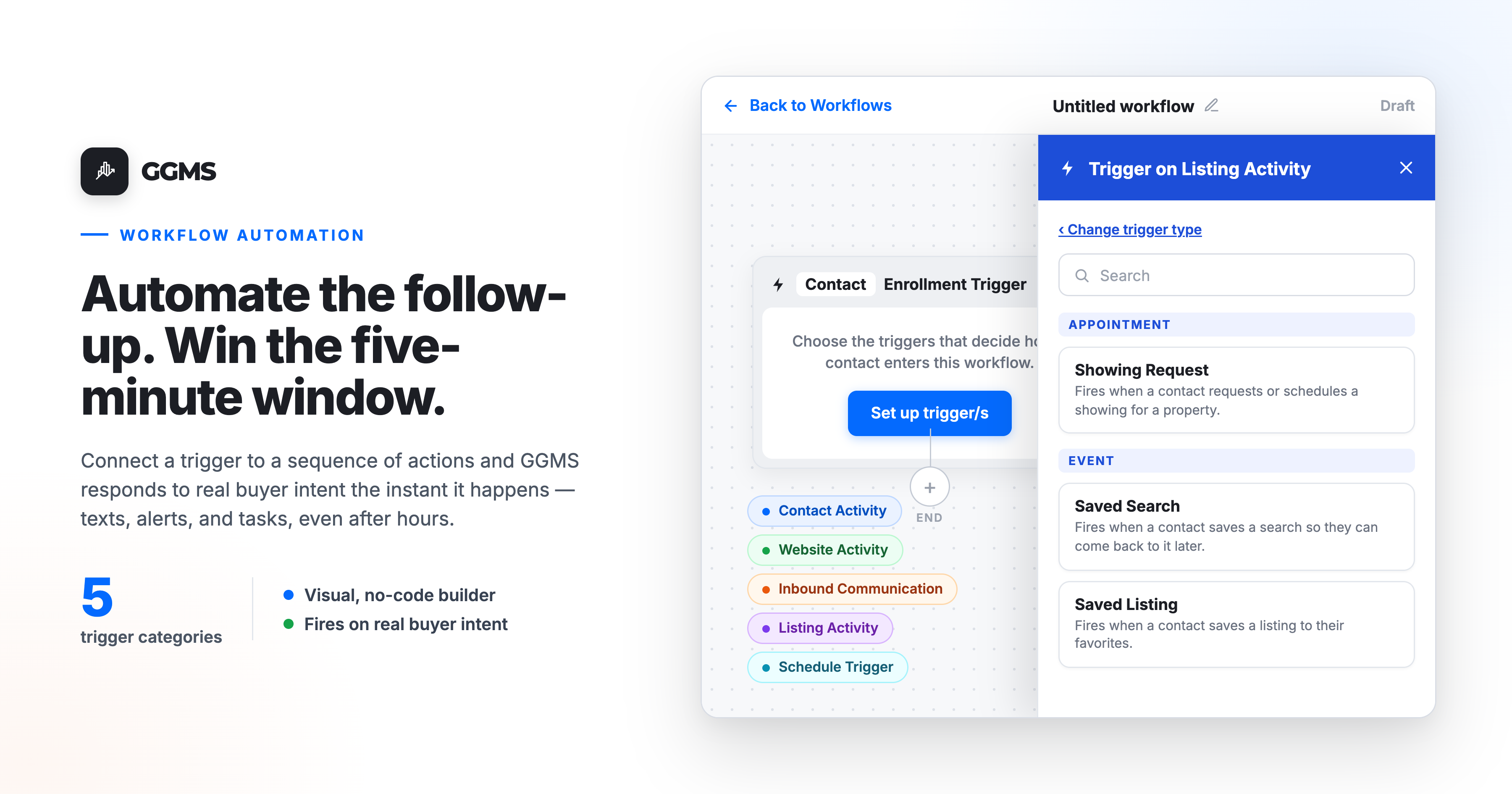
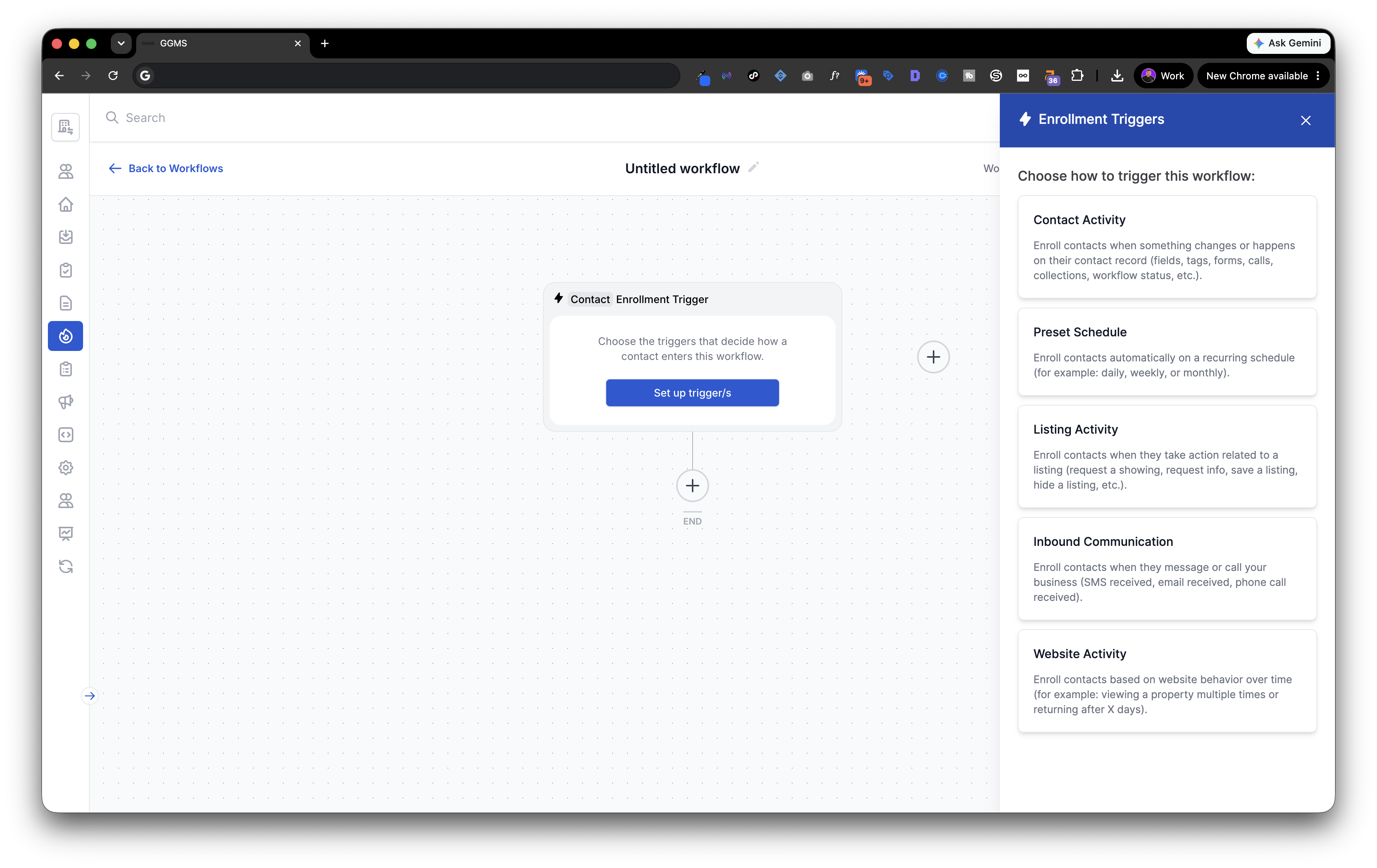
The GGMS workflow builder is a visual, drag-and-drop canvas where you connect a trigger ("when this happens…") to a sequence of actions ("…do this"). Send a text. Fire an email. Notify the agent. Assign a task. Add a tag. Wait two days, then follow up again.
Building a workflow takes minutes, not code. But the part that makes it powerful for real estate specifically isn't the actions — most CRMs can send an email. It's the triggers: what the system is allowed to watch for, and how precisely it can detect real buyer intent.
Here's the key advantage. Because GGMS runs both your IDX website and your CRM, your automations can fire on real-estate-specific behavior that generic, bolt-on CRMs simply can't see. A standard CRM knows when someone fills out a form. GGMS knows when someone viewed the same listing three times this week, saved a search, requested a showing, or came back to your site after going quiet for a month. That's the difference between automating paperwork and automating intent.
Why trigger-based automation matters so much in real estate
Real estate is one of the most intent-rich industries there is. A buyer doesn't just "exist" in your database — they leave a constant trail of signals about how serious they are and what they want:
- They view a property once, then come back to it again and again.
- They save a search for "3-bed, 2-bath under $500K in your farm area."
- They favorite a listing.
- They request a showing.
- They reply to a text at 10 PM on a Sunday.
Each of those is a moment of peak interest — and buyer intent decays fast. The reason the five-minute rule works isn't magic; it's that the buyer is thinking about real estate right now. Wait an hour and that focus is gone.
Trigger-based automation lets you meet the buyer inside that window, automatically, on the specific behavior that signals they're ready. It also closes the after-hours hole that quietly drains most agents' pipelines: a large share of real estate inquiries arrive evenings and weekends, exactly when manual follow-up is least likely to happen. A trigger doesn't care that it's Sunday night.
In short: triggers turn your website and CRM into a 24/7 listening system that responds to buyer intent the moment it appears — so "first responder" can be a machine buying time for the human.
The five trigger types in the GGMS builder
When you set up an enrollment trigger, GGMS organizes the options into five categories. Together they cover nearly every meaningful signal a real estate contact can send.
1. Contact Activity. The broad, everyday CRM signals — the connective tissue that lets your automations respond to records, forms, and calls.
- New Contact Added — a new contact is created in the CRM from any source
- Tag Added / Tag Removed — one or more selected tags are added to or removed from a contact
- Contact Field Updated — a selected field changes to a new value
- Form Submitted / Form Viewed — a contact submits a tracked form, or views a page with one without submitting
- Collection Membership Changed — a contact is added to or removed from a collection
- Call Started / Call Ended — a call with a contact connects or disconnects
- Enrolled in / Unenrolled from Workflow — a contact enters or exits another workflow
2. Website Activity. The behavioral, intent-heavy triggers that are unique to owning your IDX platform.
- Property Viewed Multiple Times — a contact views the same listing at least X times within Y days (you set the thresholds)
- Returns to Site After Days — a contact comes back after being away for at least X days since their last visit
3. Inbound Communication. Triggers that fire when a known contact reaches out to you — perfect for instant acknowledgment and routing.
- SMS Received — a contact texts your agency or assigned agent number
- Email Received — a contact emails your connected email address
- Phone Call Received — a contact calls your agency or assigned agent number
4. Listing Activity. The real estate purchase-intent signals — where casual browsers reveal themselves as serious buyers.
- Showing Request — a contact requests or schedules a showing for a property
- Information Requested — a contact submits a request for more info on a listing
- Saved Search — a contact saves a search to return to later
- Saved Listing — a contact favorites a listing
- Page Visited — a contact visits a specific page or URL on your site
- Listing Hidden — a contact hides a listing so it no longer appears in their results
5. Schedule Trigger. Time-based rather than behavior-based — great for recurring nurture, weekly market updates, and check-in cadences.
- Calendar Date — run on a specific date and time you choose
- Days of Week — run on selected days (e.g., every Monday)
- Time of Day — run at a set time each day in your agency time zone
You don't need to memorize all of these. The point is the range: from "someone filled out a form" all the way to "someone keeps obsessing over 123 Maple Street." Let's make that concrete.
Example workflow #1: Win the five-minute window automatically
The trigger: Showing Request (Listing Activity) — or Form Submitted (Contact Activity) for general inquiries.
The problem it solves: A buyer requests a showing at 8:47 PM while you're at dinner. Historically, that lead sits until morning, by which point they may have toured with whoever answered first.
The workflow:
- Trigger: Contact requests a showing.
- Action — instant SMS (within seconds): "Hi Sarah! This is [Agent] with [Brokerage]. Got your request to see 123 Maple St — love that one. I can do tomorrow at 2 PM or 4 PM. Which works?" (A real reply that holds attention and asks a question, not a robotic "we'll get back to you.")
- Action — notify the agent: Push notification and text alert so you can jump in personally if you're free.
- Action — create a task: Auto-assign a "Confirm showing — 123 Maple St" task due in 1 hour.
- Action — wait + follow up: If no reply in 10 minutes, send a gentle nudge. If still nothing the next morning, drop them into a longer nurture sequence.
You've now responded in seconds, captured the buyer at peak intent, looked impressively professional, and protected the lead — whether or not you were holding your phone. That's the five-minute rule, automated.
Example workflow #2: Pounce on the obsessed buyer
This is the one a generic CRM can't pull off, and it's where owning your IDX site pays for itself.
The trigger: Property Viewed Multiple Times (Website Activity) — say, the same listing viewed 3+ times in 4 days.
The problem it solves: Some of your hottest buyers never fill out a form. They just keep quietly returning to the same property. A normal CRM is blind to them. GGMS sees it.
The workflow:
- Trigger: Contact views the same listing 3 times in 4 days.
- Action — add a tag: "Hot — High Interest" so the contact is flagged everywhere in your CRM.
- Action — notify the agent with context: "Heads up — Mike Chen has viewed 456 Oak Ave 3 times this week. Might be worth a personal call."
- Action — automated, behavior-aware text: "Hi Mike, I noticed 456 Oak Ave caught your eye. It's a great property and homes in that neighborhood have been moving fast. Want me to set up a private showing or send you a few similar listings?"
- Action — branch: If they reply or request a showing, route them straight to Example #1's fast-response flow. If they go quiet, pair it with a Returns to Site After Days trigger to re-engage when they pop back up.
You've identified a serious buyer no form would have flagged, reached out with a message that proves you're paying attention, and done it before a competitor noticed anything at all.
The pattern to remember: the more specific the trigger, the more relevant the action — and relevance is what makes automation feel like great service instead of spam. A "Returns to Site After Days" trigger can launch a re-engagement sequence. A "Saved Search" trigger can kick off a listing-alert nurture. A scheduled trigger can send a weekly market update every Monday at 8 AM. Same builder, endless combinations.
What this means for your business
Trigger-based automation in GGMS isn't about replacing the agent — it's about making sure the agent never loses a lead to a slow clock. Set up well, it delivers:
- First-responder advantage on autopilot, even after hours, which is where the majority of inquiries actually land.
- More qualified conversations, because you're reaching buyers at peak intent instead of 15 hours late.
- A stronger first impression, since fast, relevant responses signal professionalism before you've even spoken — and that reputation compounds into referrals.
- Consistency, so every lead gets the same disciplined follow-up instead of whichever ones you happened to remember.
Speed wins the first conversation. Persistence wins the deal. The GGMS automation builder handles both — triggered by the exact moments your buyers tell you they're ready.
Frequently asked questions
What is real estate CRM automation? Real estate CRM automation uses trigger-based workflows to automatically respond to contact and buyer behavior — sending texts, emails, alerts, and tasks the moment something happens, without manual effort. In GGMS, you build these workflows visually by connecting a trigger ("when this happens") to a sequence of actions ("do this").
What kinds of triggers can start a GGMS workflow? GGMS offers five categories of triggers: Contact Activity (forms, tags, fields, calls), Website Activity (property viewed multiple times, returns to site after days), Inbound Communication (SMS, email, or phone call received), Listing Activity (showing requests, saved searches, saved listings, info requests), and Schedule Triggers (specific dates, days of the week, or times of day).
Why is speed-to-lead so important in real estate? Buyer intent peaks at the moment of inquiry and decays quickly. Agents who respond within five minutes are about 21 times more likely to qualify a lead than those who wait 30 minutes, and 78% of buyers work with the first agent who responds (NAR 2025). Automated triggers let you respond in seconds, every time.
How is this different from a generic CRM? Because GGMS runs both your IDX website and your CRM, its triggers can fire on real-estate-specific behavior — like a contact viewing the same listing repeatedly or saving a search — that bolt-on CRMs can't detect. That lets you automate genuine buyer intent, not just form fills.
Do I need any technical or coding skills to set this up? No. The GGMS workflow builder is a visual, drag-and-drop canvas. You choose a trigger, add your actions, and turn it on. Most workflows take only a few minutes to build.
.png)