The moment a buyer lands on your website, they're comparing it to something — whether they realize it or not. They've spent hundreds of hours on Zillow, Redfin, and realtor.com. That's the search experience their brain treats as "normal." So when they arrive on your site and the search works differently — the bar isn't where they expect it, the filters behave strangely, the map doesn't do what maps are supposed to do — they feel the friction instantly. And a frustrated buyer doesn't email you. They just leave.
The best property search on an agent's website isn't the one with the most features. It's the one that feels so familiar the buyer never has to think about it. That's the principle GGMS search is built on, and it's worth understanding why before we walk through how.
Familiarity isn't boring — it's frictionless
There's a well-known principle in user-experience design called Jakob's Law, named for usability researcher Jakob Nielsen of the Nielsen Norman Group. The short version: users spend most of their time on other websites, so they expect yours to work like the ones they already know.
For a real estate website, "the ones they already know" are the national portals. Your buyers learned how to search for a home on Zillow and Redfin long before they found you. They've built a mental model — search bar at the top, a price filter, a beds/baths filter, a map with price pins they can pan and zoom. When your site mirrors that model, they can search on instinct. When it deviates, they have to stop and relearn, and every second of relearning is a second they're deciding whether your site is worth the trouble.
Familiar doesn't mean generic. It means the interface fades into the background so the listings — your inventory, your market, your value — take center stage. That's the whole point.
More filters don't make a better search
The opposite failure is just as common: trying to be helpful by exposing every field the MLS has to offer. Lot size, HOA range, roof type, garage count, twelve status checkboxes, a dozen property subtypes — all visible, all at once, on the first screen.
This runs straight into a second UX principle, Hick's Law: the time it takes to make a decision grows with the number and complexity of the choices in front of someone. Pile on options and you don't empower the buyer — you overload them. Choice overload leads to hesitation, decision fatigue, and the same outcome as an unfamiliar interface: they abandon the search.
The answer isn't to strip the power out. It's progressive disclosure — put the handful of controls buyers actually use up front, and tuck the advanced ones behind a panel for the smaller group who want them. Keep the default view clean. Let depth be available, not unavoidable.
How GGMS search mirrors what buyers already know
Put those two principles together — familiarity plus restraint — and you get the search experience on a GGMS IDX site. Here's how each piece maps to the patterns buyers arrive expecting.
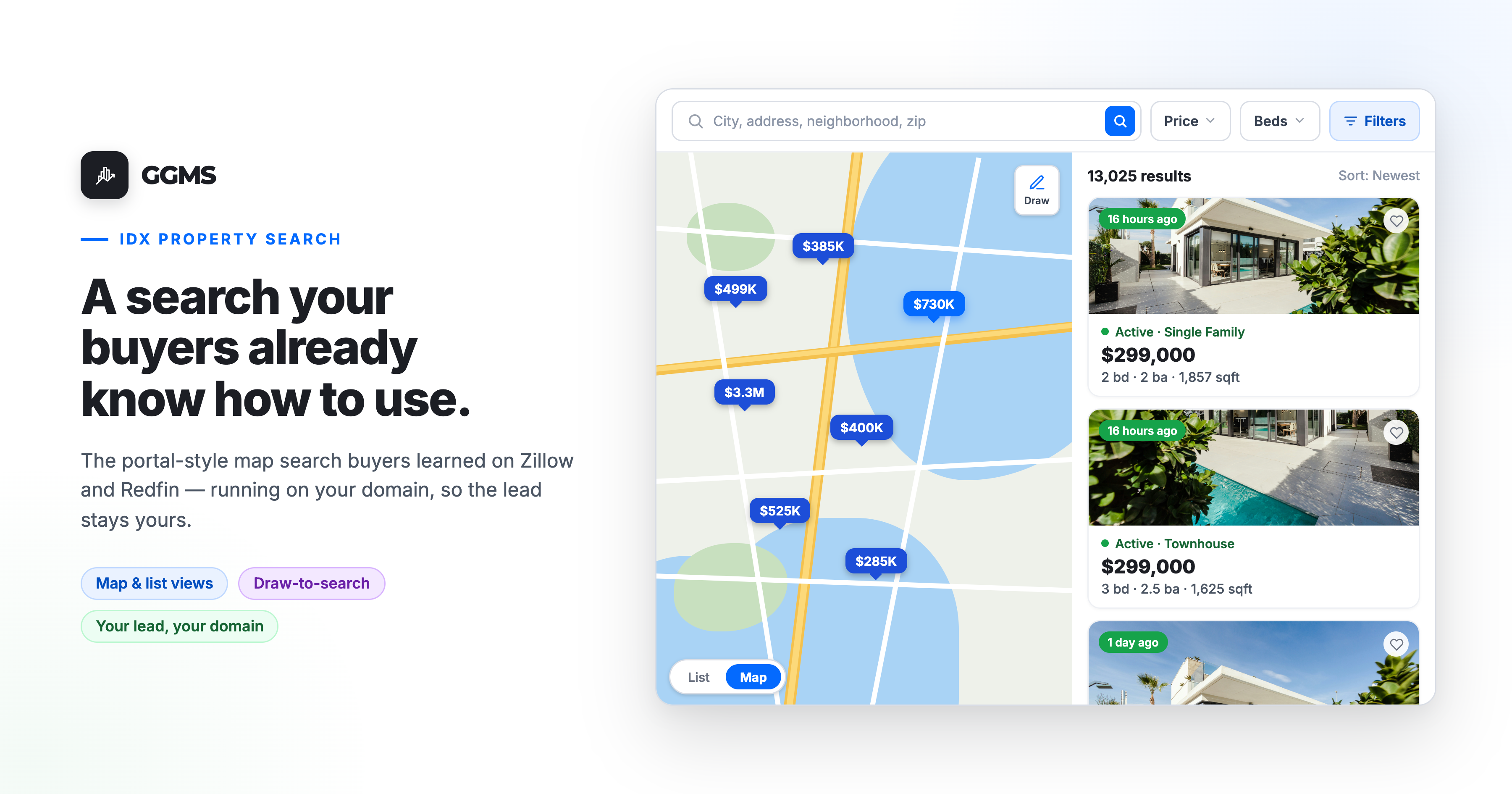
A single, obvious search bar. One open text box at the top — city, address, neighborhood, or zip — exactly where Jakob's Law says it should be and exactly how the portals do it. No buyer has ever needed instructions to find it.
A status control that speaks portal language. For Sale, For Rent, and Sold, with the sub-options buyers recognize: Coming Soon, Active, Under Contract / Pending, and sold time ranges (last week through last five years). The same vocabulary they've already learned elsewhere.
Property type as a visual grid. Single Family, Townhouse, Condo, Multi-Family, Apartment, Manufactured, and more — shown as labeled icons with "Any" selected by default. Buyers scan it in a glance instead of parsing a long dropdown.
The filters buyers actually use, up front. Price and Beds / Baths sit right in the main bar as compact dropdowns. These are the controls the overwhelming majority of searches touch — so they get prime real estate, and nothing else competes with them.
Real power, tucked away. The full Filters panel slides out only when a buyer asks for it. That's where the depth lives: keyword search with AND/OR logic, one-tap popular keywords like Pool, Waterfront, Basement, Pond, and Gated, plus status, price, beds/baths, and time-on-site refinements. Power users get everything they want; everyone else never has to look at it. That's progressive disclosure doing its job.
A map that behaves like a map. List and Map views toggle in one tap, price pins cluster and expand as you zoom, and a draw tool lets a buyer trace the exact neighborhood or school boundary they care about. This is the map-first behavior buyers learned on Redfin and Zillow — same muscle memory, same result.
Save Search, where they expect it. The familiar "save this and alert me" pattern, so a buyer can come back to an active search instead of starting over.
None of this is novel for the buyer — and that's the achievement. Every interaction borrows a mental model they already have, so the search disappears and the homes come forward.
The difference that actually matters: the lead stays yours
Here's where a GGMS site and the national portals part ways.
On Zillow, Redfin, and realtor.com, that polished, familiar search experience is working for the portal. The audience is theirs. The lead is theirs to sell, sometimes back to you, sometimes to three of your competitors at once.
On a GGMS IDX site, the buyer gets the same instantly-familiar experience — but it's running on your domain. The traffic is yours. The saved searches are yours. And because GGMS owns both the IDX website and the CRM, the buyer's behavior on that search — what they viewed, what they saved, what they searched for — can feed automations and triggers built specifically for real estate. A generic CRM bolted onto a third-party site can't see any of that. Familiarity keeps the buyer comfortable; ownership keeps the lead yours.
What it looks like for a buyer
A buyer taps your listing ad and lands on your site. They type "Clearwater" into the search bar, set a price ceiling, tap "3+ beds," and flip to the map. They draw a loop around the school zone they're set on, scan the price pins, and save the search so they get alerted on new matches.
At no point did they read a tooltip or wonder how anything worked — every action mirrored something they'd already done a hundred times on a portal. The difference is that this time, they did it on your website, and they're now a contact in your CRM instead of a lead the portal will resell.
That's the entire goal: an experience familiar enough to feel effortless, on a platform where the effort pays off for you.
Frequently asked questions
Why should my real estate website search work like Zillow or Redfin? Because that's the experience your buyers already know. They've spent far more time on the national portals than they ever will on your site, so they arrive with fixed expectations about how search should behave. Matching those patterns removes friction and lets them focus on your listings instead of relearning an interface.
Doesn't copying the big portals make my site feel generic? Familiar and generic aren't the same thing. Mirroring proven search patterns is what makes your site easy to use; your branding, your content, your market expertise, and your follow-up are what make it distinct. Familiarity in the mechanics frees the buyer to pay attention to everything that's actually unique about you.
How many filters should a property search have? Show the few buyers use constantly — location, price, beds/baths, property type, status — and keep everything else behind an advanced panel. Putting every MLS field on the first screen overwhelms more buyers than it helps. The goal is a clean default with depth available on request.
Will buyers really stay on my site instead of going back to a portal? They're far more likely to when the search doesn't fight them. An unfamiliar or cluttered search is one of the fastest ways to send a buyer back to Zillow. A familiar one removes the reason to leave — and because it's on your domain, the engagement and the lead stay with you.
Does a simpler search experience help with leads? Indirectly but meaningfully. A search buyers can use without frustration keeps them on the page longer, surfaces more relevant listings, and makes them more likely to register and set up alerts. On a GGMS site, that activity flows straight into your CRM, where real-estate-specific automations can act on it.
See it on your own site
Want to see the GGMS search experience running live? Reach out to sales@ggms.com and we'll walk you through how it looks and behaves on a real agent site.
.png)