Every GGMS IDX website ships with Google Site Kit already installed and activated. It's Google's official WordPress plugin, and it pulls the data that actually tells you whether your website is working: how people find you in Google, what they do once they land on a listing, and how fast your pages load on the phones your buyers are using.
Most agents never see this data because connecting Google's tools to a website usually means wrestling with verification codes, tracking snippets, and three separate Google products. We've taken the install-and-activate step off your plate. All that's left is a single click to connect it to your own Google account.
Here's what Site Kit does, why it's worth two minutes of setup, and how to read the numbers once they start flowing.
What "automatically installed" actually means
Let's be precise, because the distinction matters.
What GGMS handles for you: The Site Kit plugin is pre-installed and activated on your IDX website before you ever log in. You don't download anything, you don't search the WordPress plugin directory, and you don't touch a line of code.
What you do: Open Site Kit from your WordPress dashboard and click Sign in with Google. That connects the plugin to your Google account, so the data lives under your name, not ours. During that short setup flow you authorize Search Console and Google Analytics, and PageSpeed Insights connects automatically once setup is complete.
That's the whole job. A couple of minutes, one Google login, and your website starts reporting back to you.
The three tools that matter for a real estate site
Site Kit can connect several Google products. For an agent running an IDX website, three of them carry almost all the value. Here's what each one tells you and why it's useful when you're selling homes.
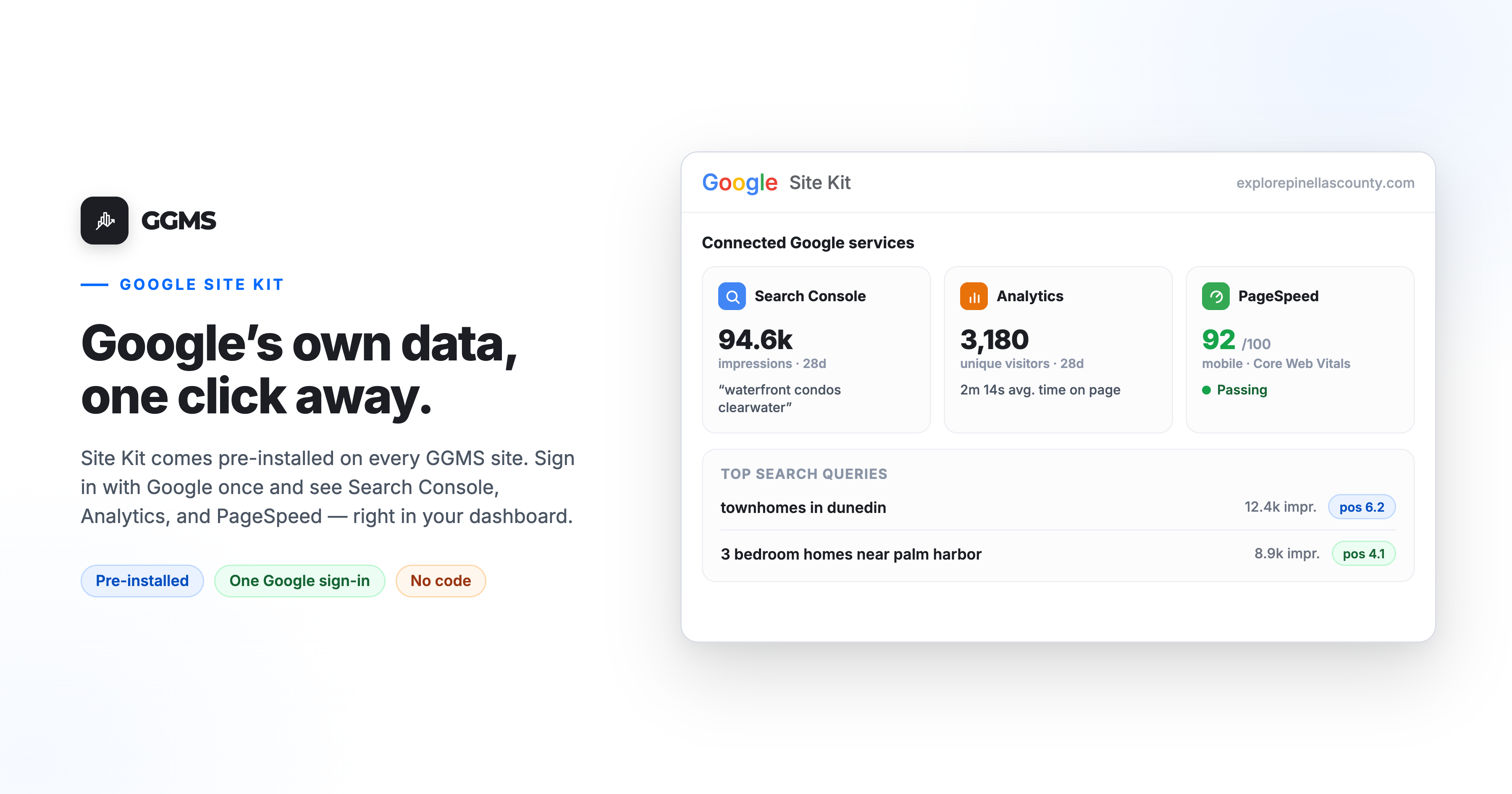
Search Console: how buyers find you in Google
Google Search Console is a free Google service that helps you monitor and improve how your site appears in search results. Site Kit adds your site to Search Console automatically during setup, and surfaces the key numbers right inside your WordPress dashboard.
For a real estate agent, this is the closest thing to reading your buyers' minds. You can see the actual search terms bringing people to your site — things like "waterfront condos in Clearwater" or "3 bedroom homes near [school district]" — along with how many times you showed up in Google (impressions), how often people clicked, and where you rank. As an administrator, you can also view data specific to the page you're currently looking at using the WordPress admin toolbar.
Why it matters: When you see that a neighborhood or property type is already pulling impressions, that's Google telling you where to point your next blog post, video, or community page. You stop guessing about content and start following demand that already exists.
Google Analytics: what visitors do once they're on your site
Google Analytics (GA4) tracks traffic and visitor behavior. Site Kit places the Analytics code snippet for you, which eliminates the need to manually place Analytics code and avoids the common mistakes that come with it.
Inside the Site Kit dashboard you'll see total unique visitors, average time on page, unique visitors over the last 28 days, and your top content over that period. The data is filtered to display information specific to your WordPress site, so you're looking at your numbers and nobody else's.
Why it matters for a video-first GGMS site: Search Console tells you how people found you; Analytics tells you what happened next. Which listing pages hold attention? Are visitors actually watching the videos you embed, or bouncing in ten seconds? Average time on page and top-content reports show you which properties and which neighborhoods are earning real engagement — the kind that turns a browser into a registered lead.
PageSpeed Insights: whether your pages load fast enough to keep them
PageSpeed Insights reports how your pages perform on mobile and desktop and tells you how to make them faster. It is one of the core services in Site Kit and is automatically connected once plugin setup is complete, with no additional steps required.
It scores your pages and breaks the results into "In the Lab" data from a simulated load, "In the Field" data representing real-world user experiences over the past 28 days, and a "How to improve" section with actionable suggestions, including WordPress-specific recommendations where possible. The whole thing is built around Core Web Vitals, Google's measure of real-world loading and responsiveness.
Why it matters: Real estate is a mobile business. Buyers pull up listings standing in a driveway or sitting in a parked car, and a page that stalls loses them before the first photo loads. Speed also feeds into how Google ranks you. One reassuring note for the cautious: PageSpeed Insights, when enabled within Site Kit, operates on your WordPress admin panel only and does not directly impact performance for regular visitors to your site.
A real-world workflow
Here's how the three fit together in a single Monday-morning routine.
You open your WordPress dashboard and glance at the Site Kit widget. Search Console shows a spike in impressions for "townhomes in Dunedin" — people are searching it and seeing your site, but your click rate is low. That's a signal: you have visibility but a weak headline or thin page. You write a fresh community page targeting that search.
A week later, Analytics shows that page climbing your top-content list with a healthy average time on page — visitors are landing and staying. Good sign that the content matched intent.
Then you check PageSpeed Insights for that page and notice the mobile score is dragging because of an oversized hero image. You swap it, the score climbs, and the page is now both findable and fast.
That's the loop: find what people search, see what holds their attention, and make sure the page loads fast enough to convert. Site Kit puts all three in one place, inside the dashboard you already use.
The honest case for setting it up
Site Kit won't magically rank you higher or generate leads on its own — no plugin does. What it does is end the guesswork. Instead of wondering whether your website is pulling its weight, you get Google's own data on findability, engagement, and speed, in plain language, without logging into three separate Google products or hiring someone to wire up tracking codes.
For most agents, that visibility is the difference between a website that's a line item and a website that's a tool. And because GGMS already handles the install, the only thing standing between you and that data is a single Google sign-in.
Frequently asked questions
Is Site Kit already on my GGMS website? Yes. The plugin is pre-installed and activated on every GGMS IDX site. You finish setup by opening Site Kit in your WordPress dashboard and clicking Sign in with Google to connect your own Google account.
Does it cost anything? No. Site Kit and the Google services it connects — Search Console, Analytics, and PageSpeed Insights — are all free.
Do I need a Google account? Yes, a free Google account is all that's required. The data connects to your account, so it stays yours.
Do I need to know how to code? No. GGMS handles the install, and Site Kit places the necessary tracking code for Analytics automatically during setup, so there's nothing technical for you to configure.
What's the difference between Search Console and Analytics? Think of it as before and after the click. Search Console shows how people find you in Google search — the terms they use, your impressions, clicks, and ranking. Analytics shows what they do after they arrive — pages visited, time spent, and which content performs best.
Can I see data for a single listing or community page? Yes. Using the WordPress admin toolbar, you can view Site Kit data specific to whichever page you're currently viewing on your site, which is handy for checking how an individual listing or neighborhood page is performing.
Will it slow down my website? PageSpeed Insights runs only inside your WordPress admin area and doesn't affect the experience for regular visitors. The Analytics tag Site Kit places is the standard, lightweight Google tag used across millions of sites.
Connect Site Kit and start reading your data
It's already installed. Open Site Kit from your WordPress dashboard, click Sign in with Google, and your website starts telling you what's working.
If you have questions about your GGMS website or want to learn more about getting a video-first IDX site of your own, reach out to our team at sales@ggms.com. For help with an existing site, contact support@ggms.com.
.png)